


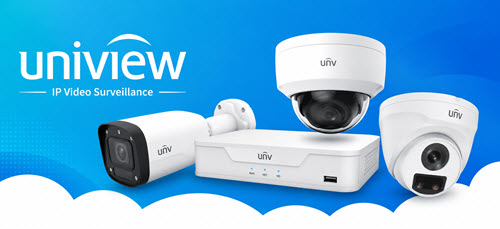

Uniarch Uniview NVRs — The Smart Brain Behind Your IP Security System
Looking for a reliable, easy-to-use Network Video Recorder to power your IP camera system? Our Uniarch by Uniview NVR range covers every installation size — from compact 4-channel PoE NVRs for home use, to 8-channel and 16-channel Pro series recorders for retail stores, offices, and commercial premises. Every Uniarch NVR delivers 4K Ultra HD recording, Ultra 265 compression (up to 95% storage saving), built-in PoE for plug-and-play camera connection, ONVIF compatibility with third-party IP cameras, and EZView remote access via smartphone — all backed by a 3-year manufacturer warranty. Want cameras and an NVR in one bundle? Explore our Uniarch Camera CCTV Kits.
Professional 4K Uniarch Network Video Recorders for Every Installation Size
Every IP camera system needs one thing above all else: a reliable, intelligent recorder that captures and stores footage without fuss. The Uniarch by Uniview NV R range is purpose-built to be that dependable foundation. It's engineered to handle everything from a simple four-camera home system to a complex 16-camera commercial installation across a large retail store, office building, or industrial site. Engineered by Uniview, one of the world's most respected video surveillance manufacturers, Uniarch NVRs deliver the recording performance of professional-grade equipment at a price point that makes IP surveillance genuinely accessible across Australia.
BuySecurityCameras.com.au stocks the complete Uniarch NVR lineup — from compact 4-channel Lite series recorders to powerful 16-channel Pro series models. Plus, all stock is genuine Australian-inventory with a full 3-year manufacturer warranty and fast nationwide shipping.
What Is an NVR — and Why Does It Matter?
A Network Video Recorder (NVR) is the central hub of any IP-based CCTV system. Unlike older DVRs that worked with analogue coaxial cable cameras, an NVR receives and processes digital video streams directly from IP cameras over standard Ethernet (Cat5e or Cat6) network cables. The NVR simultaneously records all connected camera feeds to an internal hard drive, manages motion detection and smart alert rules, provides live multi-camera display output via HDMI and VGA, and enables remote viewing through a mobile app or web browser.
Choosing the right NVR is arguably the most important decision in any CCTV installation — the NVR determines how many cameras you can connect, the maximum recording resolution, how much footage you can store, and what features your system can access. Uniarch NVRs are designed to get all of this right from day one, with a user-friendly interface that doesn't require a technical background to set up and operate.
Uniarch NVR Series — Lite vs Pro: Which One Do You Need?
Uniarch offers two distinct NVR tiers, giving you flexibility to match the recorder to your budget and installation requirements:
Uniarch Lite Series NVRs (NVR-104E2-P4 / NVR-108E2-P8)
The Uniarch Lite series is the entry-level option, designed for straightforward residential and light-commercial installations where simplicity and value are the priority. Lite NVRs deliver the core essentials: 4K recording, built-in PoE ports, HDMI and VGA output, Ultra 265 compression, ONVIF compatibility, and EZView remote access. Network bandwidth is set at 40Mbps in/40Mbps out — more than sufficient for 4–8 cameras at typical residential resolution and frame rate settings.
Best for: Home installations, rental properties, small retail shopfronts, single-level offices, and budget-conscious small business deployments of up to 8 cameras.
Uniarch Pro Series NVRs (NVR-104X-P4 / NVR-108X-P8 / NVR-216E-P16)
The Uniarch Pro series steps up the performance significantly with 80Mbps incoming and 64Mbps outgoing bandwidth — doubling the data throughput of the Lite series — enabling smooth simultaneous 4K recording across all channels without stream quality compromise. Pro series NVRs support advanced decoding for simultaneous 4K playback, more robust motion detection and smart event management, and are better suited to mixed-resolution camera setups where some channels run 8MP and others run 6MP or 4MP concurrently.
Best for: Multi-camera commercial premises, retail stores, warehouses, offices, mixed IP camera installations, and any deployment where consistent 4K performance across all channels is required.
Uniarch NVR Model Guide
Here is a clear breakdown of the key Uniarch NVR models available in our range:
NVR-104X-P4 — 4-Channel Pro PoE NVR
The most popular standalone Uniarch NVR for residential installations and small commercial sites. Four built-in PoE ports power and connect up to 4 cameras with a single Ethernet cable each. Records at up to 8MP (4K) simultaneously across all channels. Supports 1 SATA HDD up to 6TB. HDMI output at 4K (3840×2160@30Hz) and simultaneous VGA output. 80/64Mbps Pro bandwidth. Ideal for first-time IP system builders who want a no-compromise 4-camera setup.
NVR-108X-P8 — 8-Channel Pro PoE NVR The flagship 8-channel Uniarch NVR, and the recorder included in most of our Uniarch Camera CCTV Kits. Eight built-in PoE ports, 4K recording across all 8 channels simultaneously, 1 SATA HDD up to 6TB, and full Pro series bandwidth (80/64Mbps). Supports simultaneous live viewing and recording, with 4-channel synchronous playback. The go-to NVR for homes with extensive coverage needs, retail stores, offices, and light commercial premises.
NVR-216E-P16 — 16-Channel Pro PoE NVR For larger commercial installations requiring comprehensive coverage. Sixteen built-in PoE ports handle up to 16 IP cameras simultaneously. Records at up to 8MP (4K) resolution, supports 1 SATA HDD up to 6TB, and provides 4K HDMI and VGA output. With 16 channels of recording capacity, the NVR-216E-P16 is the natural upgrade path for growing Uniarch systems — perfect for multi-entry warehouses, large retail floors, schools, body corporate buildings, and commercial premises requiring broad perimeter coverage.
NVR-104E2-P4 / NVR-108E2-P8 — Lite Series (4CH & 8CH) Entry-level 4-channel and 8-channel Lite series options with the same core feature set at a reduced network bandwidth (40/40Mbps) — ideal where budget is the primary constraint and the camera count is modest.
Our Top-Rated Uniarch & Uniview NVRs
- For Large-Scale Enterprise Setups: Discover our high-capacity 128-channel NVR with 256TB storage and 8K output – ideal for multi-building campuses and large retail spaces.
- For Medium-to-Large Businesses: Explore the 64-channel NVR with 128TB storage and ANR technology to ensure uninterrupted recording even during network disruptions.
- For Small Offices & Home Setups: Choose the compact 4-channel NVR with 4 built-in PoE ports for a simple plug-and-play recording solution.
- For Budget-Conscious 4K Recording: Get the value-packed 4-channel NVR supporting Ultra 265 with 40Mbps bandwidth – great for 4MP and 8MP IP cameras.
Key Features Across All Uniarch NVRs
1. Ultra 265 Compression
Uniview's proprietary codec reduces storage requirements by up to 95% vs H.264 while maintaining full image quality. A 4TB hard drive that might hold 10 days of H.264 footage can store up to 50+ days with Ultra 265 enabled — dramatically extending retention periods without adding extra hard drives.
2. Built-in PoE Ports
No external PoE switch required. Each camera connects to its own dedicated PoE port on the NVR with a single Cat5e or Cat6 Ethernet cable, delivering both power and data. This makes installation cleaner, cheaper, and significantly faster — particularly for DIY installs.
3. 4K Ultra HD Recording & Display
All Uniarch NVRs support recording and live display at up to 8MP (3840×2160) 4K resolution. Connect directly to any 4K HDMI monitor or TV for stunning live and playback clarity.
4. ONVIF Conformance (Profile S, G & T)
Full ONVIF compatibility means your Uniarch NVR can integrate with cameras from any ONVIF-conformant manufacturer. Mix and match Uniarch cameras with other brands as your system evolves, without being locked into a proprietary ecosystem.
5. EZView Remote Access
All Uniarch & Uniview NVRs support the EZView mobile app (iOS and Android) for live viewing, playback, motion alerts, and system management from anywhere in the world. P2P connection via QR code scan — no complicated router configuration required for basic remote access.
6. Cloud Firmware Upgrade
Uniarch NVRs connect to the Uniarch Cloud for automatic or manual firmware updates, ensuring your system always has the latest features, security patches, and camera compatibility updates without manual file downloads.
7. HDD up to 6TB
Each Uniarch NVR features a single SATA hard drive bay supporting drives up to 6TB. Our range includes HDD options from 1TB to 6TB — select the storage capacity that best suits your channel count and required retention period. When the drive is full, the NVR automatically overwrites the oldest footage, maintaining a rolling continuous recording window.
8. Simultaneous HDMI & VGA Output
Connect a monitor via HDMI for high-resolution display while simultaneously using VGA for a secondary display or older screen — useful in retail or commercial environments with existing display infrastructure.
How to Choose the Right Uniarch NVR
Step 1: Count your cameras (current and planned).
Choose a NVR with at least as many channels as your planned camera count — and ideally one size up to allow for future expansion. Installing 4 cameras now but might add 2 more? Choose an 8-channel NVR from the start.
Step 2: Choose Lite or Pro.
For homes and small retail, the Lite series is cost-effective and more than sufficient. For commercial applications, multi-camera setups above 4 cameras, or installations requiring consistent 4K across all channels simultaneously — choose Pro.
Step 3: Decide on HDD size.
Use this guide as a starting point:
- 4 cameras at 6MP with Ultra 265 → 2TB ≈ 20–25 days retention
- 4 cameras at 8MP with Ultra 265 → 2TB ≈ 15–20 days retention
- 8 cameras at 6MP with Ultra 265 → 4TB ≈ 20–25 days retention
- 8 cameras at 8MP with Ultra 265 → 4TB ≈ 15–18 days retention
- 16 cameras at 6MP with Ultra 265 → 6TB ≈ 15–20 days retention
Step 4: Consider a kit.
If you're starting from scratch, our Uniarch Camera CCTV Kits include a matched NVR, cameras, and optional HDD in a single pre-configured bundle — the fastest and most cost-effective way to get your system up and running.
Build Your Complete Uniview Surveillance System
Your Uniarch NVR is the backbone — pair it with the right cameras and accessories to build a complete, future-proof IP security system:
- Uniarch by Uniview IP Cameras — Uniarch turret, bullet, and dome cameras in 4MP, 6MP, and 8MP 4K to pair with your NVR
- Uniarch Camera CCTV Kits — Pre-matched NVR + camera bundles for faster installation and better value
- Uniview CCTV Cameras — Upgrade to the full Uniview Prime and Pro IP camera range with AI analytics, ColorHunter full-colour night vision, and Smart Intrusion Prevention
- Uniview Camera Kits — Premium Uniview NVR + camera system bundles for commercial installations
- Uniview PTZ Cameras — Add a PTZ camera to your Uniarch NVR for wide-area remote-controlled monitoring
- Smart Uniview Owlview CCTV Range — Wide-angle panoramic cameras to eliminate blind spots, compatible with Uniarch Pro NVRs
Not sure which NVR is right for your setup? Contact our team — our Australian support team is available to help you select the ideal channel count, series, and storage configuration for your specific site.
FAQs
Q1: What's the difference between a Uniarch NVR and a DVR?
A Uniarch NVR connects to modern IP (digital) cameras via Ethernet cable and records at up to 4K (8MP). A DVR connects to older analogue cameras via coaxial cable and is limited to much lower resolutions. For any new system, an NVR-based IP setup is strongly recommended for superior image quality, scalability, and remote access.
Q2: What's the difference between Uniarch Lite and Pro series NVRs?
Lite NVRs (NVR-104E2-P4, NVR-108E2-P8) offer 40Mbps bandwidth — ideal for homes and small residential installs up to 8 cameras. Pro NVRs (NVR-104X-P4, NVR-108X-P8, NVR-216E-P16) deliver 80Mbps bandwidth, enabling uncompromised simultaneous 4K recording across all channels — recommended for commercial applications and larger camera counts.
Q3: Will a Uniarch NVR work with non-Uniarch cameras?
Uniarch NVRs support ONVIF (Profile S, G, T) and RTSP protocols, making them compatible with most major IP camera brands. Full feature integration (Starlight detection, EZView alerts) is guaranteed only with Uniarch or Uniview cameras.
Q4: How much HDD storage do I need?
At 6MP with Ultra 265: 2TB ≈ 20–25 days for 4 cameras; 4TB ≈ 20–25 days for 8 cameras. At 8MP (4K): expect roughly 25% less retention per TB. All Uniarch NVRs support up to 6TB in a single SATA bay. Motion-triggered recording can significantly extend these estimates.
Q5: Do I need a separate PoE switch?
All Uniarch NVRs include built-in PoE ports so you don't need a separate one — cameras simply plug into the NVR directly with one Ethernet cable each. No additional switch, power adaptor, or cabling run required.
Q6: Can I access my Uniarch NVR remotely?
All models support the EZView app (iOS and Android) for live viewing, playback, and motion alerts from anywhere in the world. Connection is via simple P2P QR code scan — no port-forwarding needed for standard remote access.
Q7: What warranty is included?
All Uniarch NVRs sold by Buy Security Cameras include a 3-year Australian manufacturer warranty on genuine Australian-inventory stock.